
Choose your title color
Title colors change the appearance of an already unlocked chat title. Default and White are automatic; the other colors unlock as you collect distinct named titles. The collection thresholds below do not consume those titles.
| Title color | Unlock requirement | Appearance sample |
|---|---|---|
| Default | Automatic | The equipped title’s own default appearance |
| White | Automatic | Color sample |
| Spanish Pink | 10 distinct titles | Color sample |
| Deep Peach | 20 distinct titles | Color sample |
| Blond | 30 distinct titles | Color sample |
| Calamansi | 40 distinct titles | Color sample |
| Nyanza | 50 distinct titles | Color sample |
| Pistachio | 60 distinct titles | Color sample |
| Tea Green | 70 distinct titles | Color sample |
| Diamond | 80 distinct titles | Color sample |
| Powder Blue | 90 distinct titles | Color sample |
| Pale Lavender | 100 distinct titles | Color sample |
| Shampoo | 120 distinct titles | Color sample |
| Classic Rose | 140 distinct titles | Color sample |
| Aquamarine | 160 distinct titles | Color sample |
Default restores the selected title’s own original text color. It does not force every title to one universal color. White is the separate option for white adjustable title text.
Build your title collection
- Open the Titles directory and choose named titles whose requirements are available to your account. Each guide explains its route and any separate costs.
- Complete different title unlocks to increase your owned collection. Equipping one title many times does not create extra copies.
- Check your unlocked-title collection at Titles Specialist. The milestones are 10, 20, 30, 40, 50, 60, 70, 80, 90, 100, 120, 140 and 160 distinct titles.
- Select the matching color after reaching its milestone. A color option is not itself an extra named title to count toward the next threshold.
Find Titles Specialist
- In the Second Sea, enter the Café in Kingdom of Rose. Go to the left side and collect the silver chest that covers the basement opening. Climb down the ladder; Titles Specialist (Axiore) is straight ahead.
- Alternatively, in the Third Sea, enter the Floating Turtle Mansion through its front entrance and look to the right for Titles Specialist.

Equip a title and its color
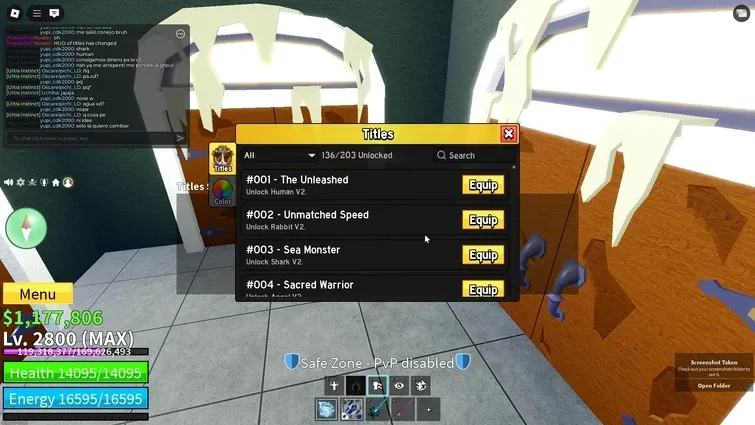
- Talk to Titles Specialist and open the Titles tab.
- Choose an unlocked named title and press its Equip control. A color does not replace the need to own the title itself.
- Open the Color tab/options on the left side of the selection interface.
- Choose an available color and use its equip/apply control. If a milestone color is locked, check the number of different titles you own.
- Choose Default when you want the equipped title’s own original appearance again. Switching colors does not require repeating the title’s acquisition quest.
Cost
Title colors are free to unlock and equip. The milestone colors require the specified number of owned titles, but do not spend or remove them. Money, Fragment or item costs belong to the individual title requirements, not to applying a color.
What it does: Recolors the adjustable text of your equipped cosmetic chat title. Title colors grant no stat, damage or defense bonus, and do not change your Aura color or unlock a named title. Default restores that title’s own original text color.
Individual color walkthroughs
- Default title color — automatic.
- White title color — automatic.
- Spanish Pink title color — 10 distinct owned titles.
- Deep Peach title color — 20 distinct owned titles.
- Blond title color — 30 distinct owned titles.
- Calamansi title color — 40 distinct owned titles.
- Nyanza title color — 50 distinct owned titles.
- Pistachio title color — 60 distinct owned titles.
- Tea Green title color — 70 distinct owned titles.
- Diamond title color — 80 distinct owned titles.
- Powder Blue title color — 90 distinct owned titles.
- Pale Lavender title color — 100 distinct owned titles.
- Shampoo title color — 120 distinct owned titles.
- Classic Rose title color — 140 distinct owned titles.
- Aquamarine title color — 160 distinct owned titles.
For the labels themselves, return to the Titles directory and follow the individual named-title guides.
Sources and appearance credits
- Titles — revision 447019 (checked 2026-11-16).
- Template:Title Color — revision 350327 (checked 2026-11-16).
- Titles Specialist — revision 451611 (checked 2026-11-16).
The owned-title thresholds and automatic Default/White options follow the pinned main title list. Template:Title Color supplies the named presentation colors. Default has no single fixed color in that template: it restores the selected title’s own default text color. Title colors are cosmetic options, separate from acquiring named titles and from Aura colors.
Actual game image credits: File:Title1.png, File:NewUserInterface.webp. Image dates, source URLs, dimensions and SHA-256 hashes are recorded in the color-guide source manifest. WebP conversion preserves the original content and aspect ratio.


The site’s labeled color previews are recreated text references, not claimed in-game screenshots. Wiki contributions are subject to the Fandom licensing terms; game assets remain the property of their respective owners.