
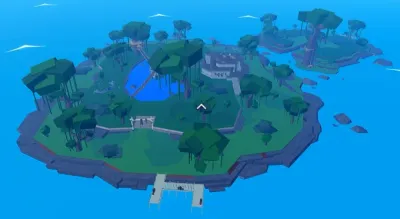
Natural fruits can appear under eligible trees around the sea. Start with a small area you can search quickly between quests.
Steps
- Pick one compact island and learn its paths first. Jungle is a convenient First Sea practice stop with trees on both landmasses. Do a quick sweep when your quest already takes you there.
- Look at the base of each candidate tree from both sides. Check behind trunks and at the edge of ledges. In Desert, some cacti count as trees, and Cursed Ship has potted plants.
- Keep moving around the island if one tree is empty. The usual reported cycle is 60 minutes, or 45 minutes on weekends, and untouched fruit usually disappears after 20 minutes. World events can change that pool or timing.
- When you pick one up, look for the natural-fruit message and read the fruit name. Store it from the held item menu, then confirm it appears in Treasure. Follow the storage steps if it will not fit.
- If nothing is there after one sweep, return to your quest or check another nearby island. A tree can be empty because the fruit spawned elsewhere, expired, or was picked up.
Cost
Natural pickups are free. Use an existing boat or movement move for the loop. The Fruit Notifier gamepass is optional.
What it does: Gives you a routine for finding physical fruits as you travel, even without a distance alert.
Sources & image credits
Checked November 22, 2026. Natural fruit locations and timing · Trees and candidate spawns · Inventory rules
In-game images by the credited file contributors: Jungle location.
